Board
.mdFrames, layout, navigation and presence.
The board is one shared surface. Every frame’s position, size and title is shared: when someone moves a frame, everyone sees it move.
Navigate
| Do | To |
|---|---|
| Drag the empty board | Pan |
| Wheel, or swipe on a trackpad, outside a frame’s content | Pan |
| ⌘/Ctrl + wheel, or pinch | Zoom about the pointer |
| − / + in the corner | Zoom out / in |
| Press the zoom percentage | Back to 100% |
| Fit (the arrows in the corner) | Fit every frame into view |
The viewport is yours alone; it is kept per board in your browser.
Frames
- Add a frame from the toolbar: Agent, Files, Browser, Terminal.
- Move it by its header, resize it from its bottom-right corner.
- Rename it by clicking its title in the header.
- Remove it with the × in its header.
Layout
Frames that sit close together form a cluster: frames within 48 px of each other, and of each other’s neighbours. Inside a cluster, frames whose top edges line up form a row, and the frames of a row share a height.
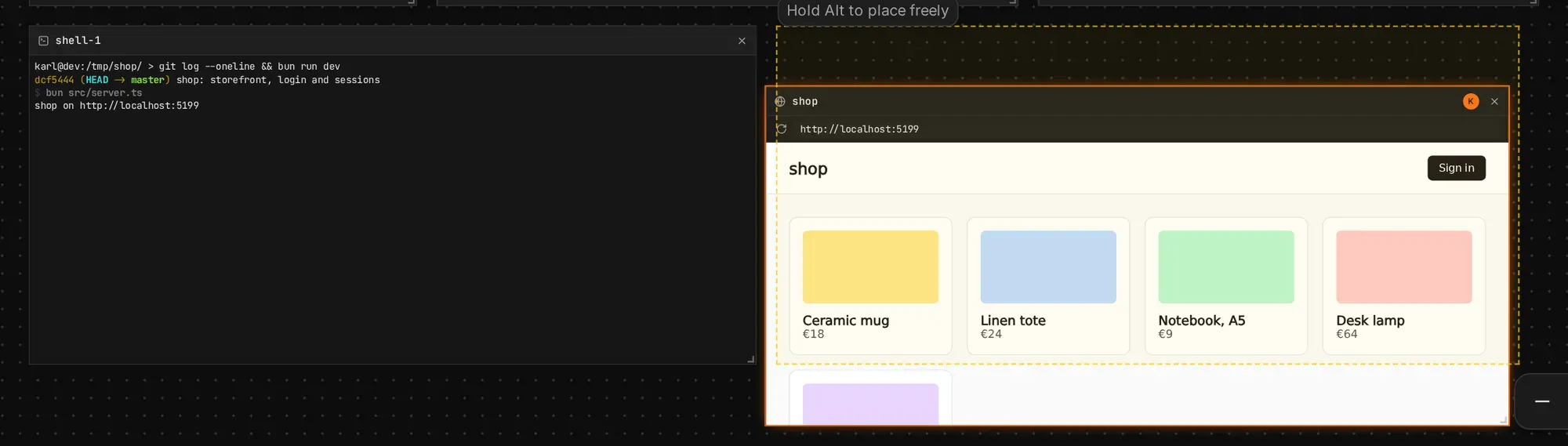
- Dropping a frame near another snaps it into that row, or into a new row above or below. A dashed outline shows where it lands. Dropped between two frames of a row, or between two rows, it goes in between and the others make room: a dotted line marks the gap it goes into.
- Moving or removing a frame closes the gap it leaves: the frames after it in its row move left, or, if it was alone in its row, the rows below move up.
- Resizing a frame’s height resizes its row, and moves the rows below.
- Hold Alt while dragging or resizing to place a frame freely.
- Hold Shift while dragging to move the frame’s whole cluster, as it is.
Agents use the same rules: they name frames and sides, never coordinates (Board tools).
Presence
- Everyone’s pointer shows with their name; the host’s is marked host.
- Text selections in agent threads and files frames show in the selecting person’s colour.
- The top bar lists everyone on the board. Your name is the field next to it; a new browser gets an animal name and a colour.
Presence carries no authority, and goes directly between peers.