Pre-release docs, for @frebreco/canvas@next. Stable docs
Board tools
.mdHow agents see and change the board.
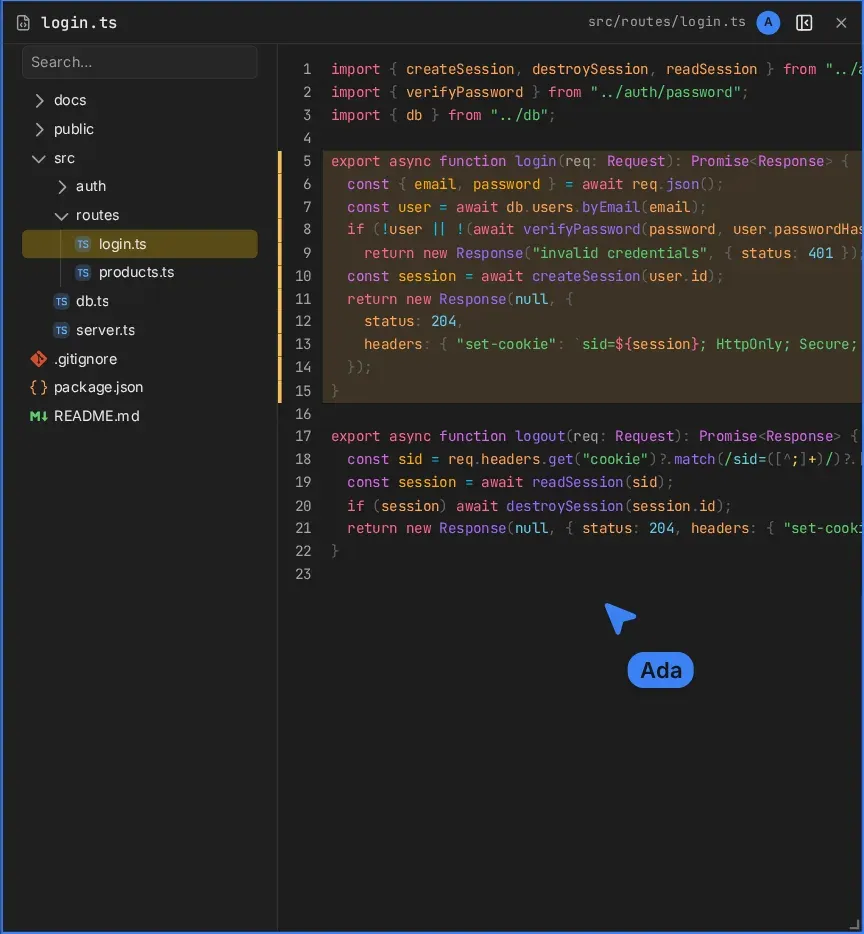
Every agent session gets tools to see and change the board. Asked to “show me the code that handles login”, an agent opens the file as a frame, at the relevant lines, next to its own frame, instead of pasting code into its reply.
| Tool | Does |
|---|---|
view_board |
Lists the agent’s own cluster row by row, and summarises the others |
view_frame |
Shows one frame in full; for a files frame, its list and its comments; a drawing as an image and its shapes |
open_frame |
Opens a frame: a file (optionally at a line range), a new scratch file, a list of files, a browser, a terminal, an agent, a drawing |
update_frame |
Points a files frame at another file, lines, a comment or a new scratch file, replaces its list, switches preview/source (markdown, HTML), changes a URL, renames, moves |
close_frame |
Removes a frame |
read_board_file |
Reads a scratch file |
write_board_file |
Creates a scratch file, or overwrites one |
add_comment |
Comments on lines of a file, in a files frame |
edit_comment, delete_comment |
Change an agent’s comment |
draw |
Adds shapes, text, arrows or a mermaid diagram to a drawing, changes or removes them |
What an agent can do
An agent has the board powers of a guest with the edit role, without approvals. Nothing it does on the board runs anything by itself:
- A terminal frame it opens is an idle shell. The agent cannot type into it.
- An agent frame it opens gets at most a prompt draft. A person sends it.
- A files frame shows only files in the shared set.
Board tool calls therefore never ask for permission. Tool calls that touch the machine, like shell commands, still ask the host.
Scratch files
Some things exist only to be shown on the board: a write-up of a feature, a diagram, a small HTML
visualisation. An agent passes that text with the tool call instead of writing a file into your
project. canvas serve keeps it in .canvas/scratch/, and the frame shows it as
canvas:scratch/<name>, rendered like any markdown or HTML file.
- Only agents write scratch files. Everyone else reads them, like any file in a files frame.
- A name is never taken twice: a second
overview.mdbecomesoverview-2.md, and the agent is told. - Any agent can read, show or overwrite any scratch file. Frames showing it update live.
- They stay in
.canvas/scratch/until you delete them.
Agents are told to use scratch files only for the board. Temp files for their own work go wherever they would without canvas.
Lists
Asked for the files of one feature, an agent can put them in a single files frame as a list, instead of opening a frame per file. Each entry is a project file or a scratch file at a display path the agent picks, optionally with lines. So one frame can hold a write-up, the code at the relevant lines, and a visualisation.
Comments
Agents read the comments people leave in a files frame, and leave their own. So you can review code together, then ask an agent to “address the comments in the login frame”.
view_boardsays which files frames have comments;view_framelists them, with their ids, authors, lines and text. For an outdated comment, it also shows what its lines used to read.- Agents aren’t told when someone comments. They look when you ask them to.
add_commentnames a file and lines.canvas servereads the lines, so the comment can follow them as the file changes.- An agent edits and deletes agents’ comments, never people’s.
update_framewith a comment’s id shows its file at its lines.
Drawings
Agents see a drawing with view_frame: an image of it, and a list of its shapes
with their labels, places and ids, and what each arrow connects. They draw with draw:
- Shapes, text and arrows, placed in the drawing’s coordinates. An arrow between two shapes names them, and is drawn between them.
- A mermaid diagram: a flowchart, sequence or class diagram, placed below what is there, as shapes people can then move and change.
- Changes: a shape given again by its id replaces it;
deleteremoves shapes, with their labels;clearremoves everything.
Agents are told to leave people’s sketches alone unless asked. The image needs a model with image input; others work from the list alone.
Placement
Agents name frames and sides (next_to, side), never coordinates. New frames go into the
agent’s own cluster, at the end of its row, unless it says otherwise; the layout
rules make room. Frames an agent opens are recorded as its own, and it is told
to leave other people’s frames alone unless asked.
Priming
canvas tells the agent what the board is, and how to behave on it, through the tool server’s instructions. Agents show these next to their own system prompt, never instead of it, and they never appear in the thread. They also name canvas’s skills, so an agent finds them among its own.
Requirements
Board tools work while the host’s browser is open: it runs every call against the board. Without it, the agent is told the board is unavailable. With several host tabs open, the first one connected runs the calls.